DM Custom Values & Mirrors
Last updated: March 31, 2026
Charlie enables you to capture key information during conversations with leads through two powerful features: Custom Values and Mirrors. These tools ensure Charlie accomplishes conversation objectives while gathering critical insights about each lead, creating more personalized, human-like interactions.
This guide explains what these features are, how they work, where to find them, how to configure them, and strategic insights for maximizing their value.
What they are?
Within each AI Setter, you have settings and functionalities that enable intelligent mapping of key information throughout conversations.
These features transform conversations from generic exchanges into personalized, data-rich interactions that both qualify leads effectively and create superior engagement experiences.
Custom Values: are predefined data fields that Charlie automatically extracts from conversations and CRM records, mapping them to standardized variables for use throughout the conversation.
Custom Values represent structured information about the lead that Charlie identifies, captures, and stores for reference and personalization.
Mirrors: are dynamic conversation captures that extract and store lead responses to specific keywords or questions, enabling Charlie to reference what the lead said in their own words.
Mirrors "reflect" back what the lead says, capturing their specific language and using it to create authentic, personalized conversation flow.
Custom values can be configured to also update your CRM records (currently just supported for Hubspot 📄 Hubspot: In-Charlie settings )
How does they work?
From the default set-up, Charlie will be already mapping some "custom values" within each conversation. And whenever it is holding a conversation with a Lead, Charlie will be looking for that data within the CRM and/or in the conversation.
Custom Values
Step 1: Charlie checks CRM
Before or during conversation, Charlie queries your CRM
Looks for existing Custom Value data in the lead's record
If data exists, pulls it into conversation context
Step 2: Charlie monitors conversation
When lead provides data matching a Custom Value (e.g., mentions their budget)
Charlie extracts and captures that information
Step 3: Charlie stores data
Captured information appears in Lead's conversation side note
Data becomes available for use in subsequent messages
Step 4: Charlie uses data
Custom Values can be inserted into script using variables
Enabeling personalization & continuity: "Based on your budget of {budget_value}..."
Mirrors
Step 1: Define Mirror Keyword
You create a Mirror with a specific keyword (e.g., "Goal," "Challenge," "Timeline") of what you're trying to capture
Step 2: Charlie Asks or Listens
During conversation, Charlie asks question containing or related to Mirror keyword or naturally listens for lead to mention related information
Step 3: Lead Responds
Lead provides answer containing desired information
Step 4: Charlie Captures Response
Charlie extracts the lead's answer
Stores it associated with the Mirror keyword
Makes it available for later reference
Step 5: Charlie References Mirror
Later in conversation, Charlie can reference what lead said
Uses Mirror variable to insert lead's exact words
Creates natural continuity and personalization
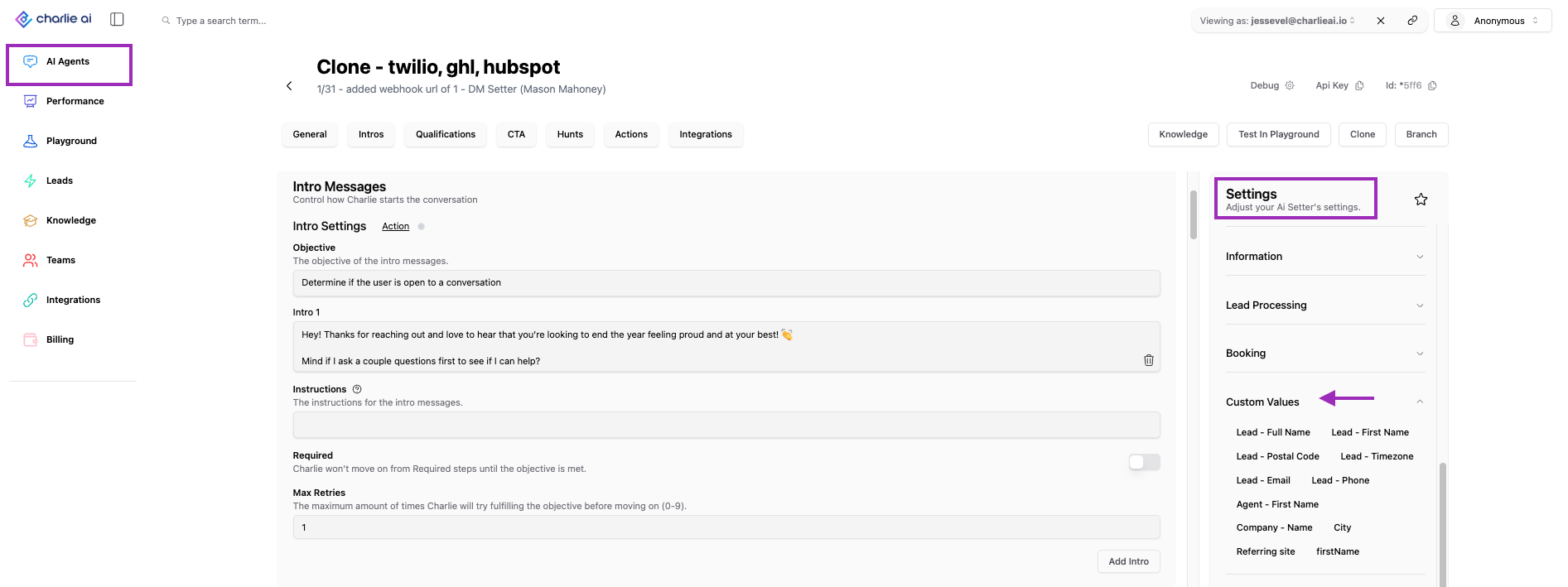
The greater value, is that you can reference Mirrors and custom values in your scripts using the values in your settings menu, this will create continuity, personalization and a more natural, human-like conversation.
Visual guidance -> Insert in scripts
Main differences:
Custom Values are dependent on CRM integration, they pull existing data from CRM records, while Mirrors are NOT dependent on CRM integration, they operate entirely within the conversation context.
Configuration
Charlie automatically maps these Custom Values from the default setup:
Default custom Values
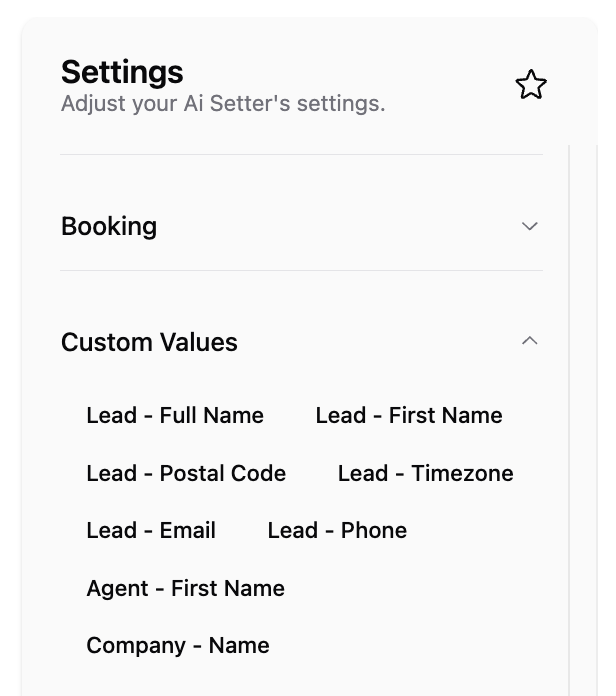
These represent the most commonly needed information across diverse use cases, enabling immediate functionality without custom configuration.
Default custom values can not be deleted
But if you want to include additional Values for Charlie to map out, we have 2 different paths to configure it.
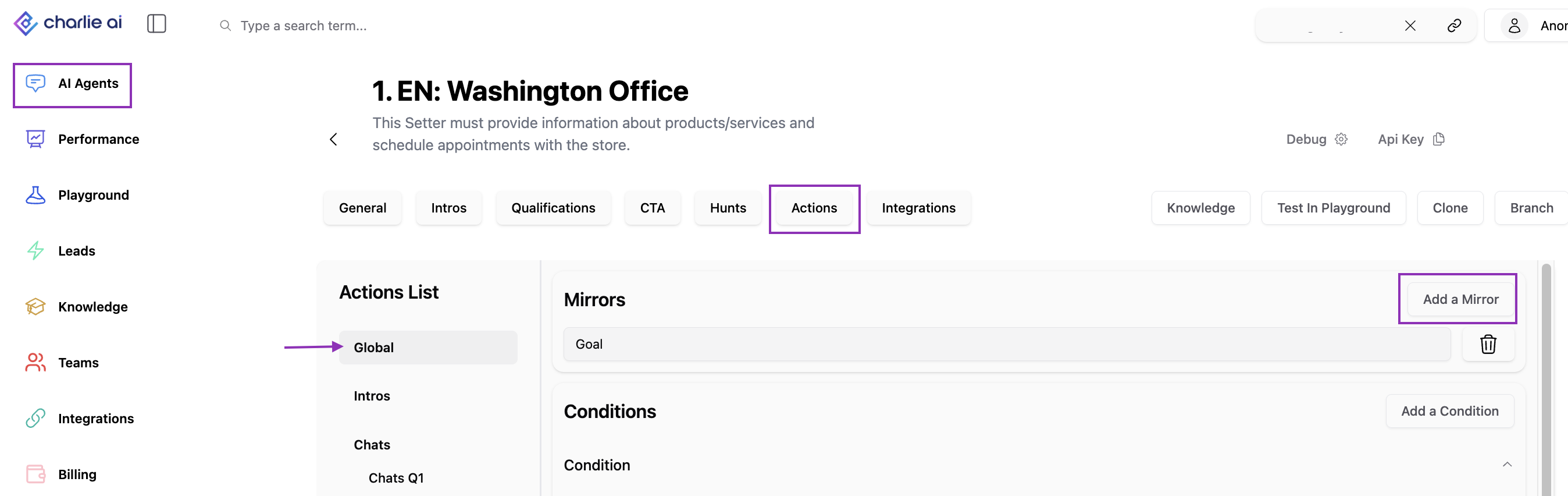
1. From Mirrors
This can be done in all the AI setters you have configured in Charlie, just need to follow the steps, and Charlie will look for the lead's respond to that exact word.
Process:
Go to AI Setters and select one use case
Go to the "Actions" option in the top menu
Click on "Global" option
Look for the "Add a Mirror" button
Write down the information you want to map
2. Custom Values from Hubspot integration
Where to find them
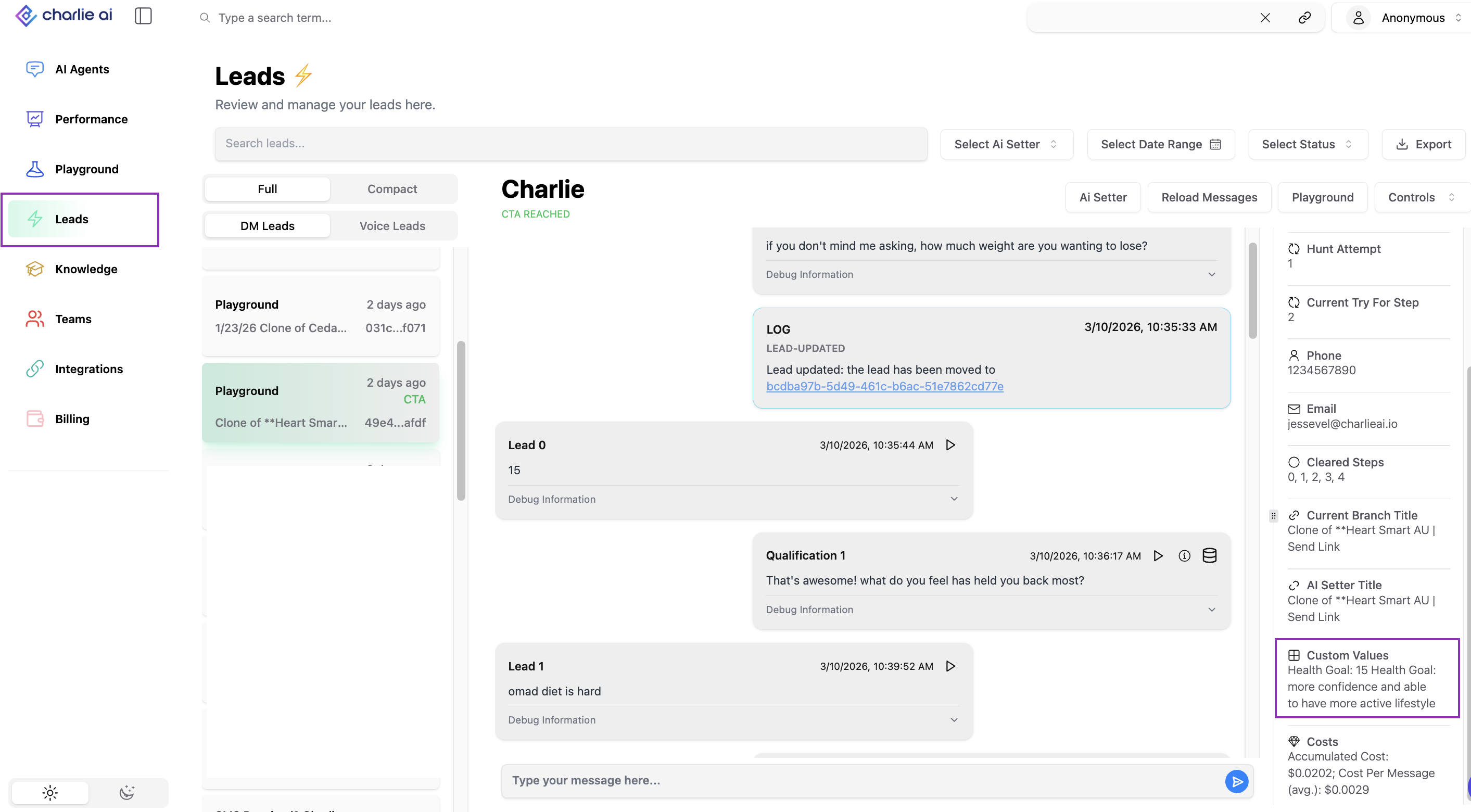
Within each of your leads conversations you'll find a section where all the key information mapped out will appear. It's at the right side menu, in the "custom value section"
Visual guidance -> In lead conversation
Key Insights
Focus on capturing fewer values (5-8) that you consistently use for personalization, qualification routing, and CRM enrichment, rather than capturing many values that sit unused. Teams that use 80%+ of captured Custom Values in their scripts or qualification logic achieve 2-3x higher conversion
Principal value of Mirrors is using the lead's exact language to create authentic personalization. When Charlie inserts the lead's own words, the conversation feels like genuine listening. This psychological authenticity drives 40-60% higher engagement than generic personalization because leads subconsciously recognize their own voice being valued and remembered.
Most businesses have partial lead data in their CRM from previous interactions, Custom Values bridges data, enabling Charlie to avoid asking questions you already know the answer to, while capturing new information to complete the picture.